Anthony Bellavia
  • Projects
  • About
  • Contact
  • Design Process

Deus Ex App - Aug Assist

1/20/2017


Click the image below to see the full app presentation.

Picture
Hi folks! It’s been a while since I’ve done one of these. Here is my new “fake-for-funsy” app. This one is based on a game called “Deus Ex: Mankind Divided” developed by Eidos Montreal, published by Square Enix. 

For those that don’t know (If you do know the game, skip to the third paragraph), Deus Ex is about a dystopian future. The story is very social political, especially this latest game. The focus is a growing divided between normal people and augmented. Augmented people are those with robotic limbs or parts. Some people have them due to disease, accidents, or other incidents. While others got them because they wanted to simply be better, faster, stronger. Some might make the connection within our real worlds divides that exist, but that’s an entirely different discussion.
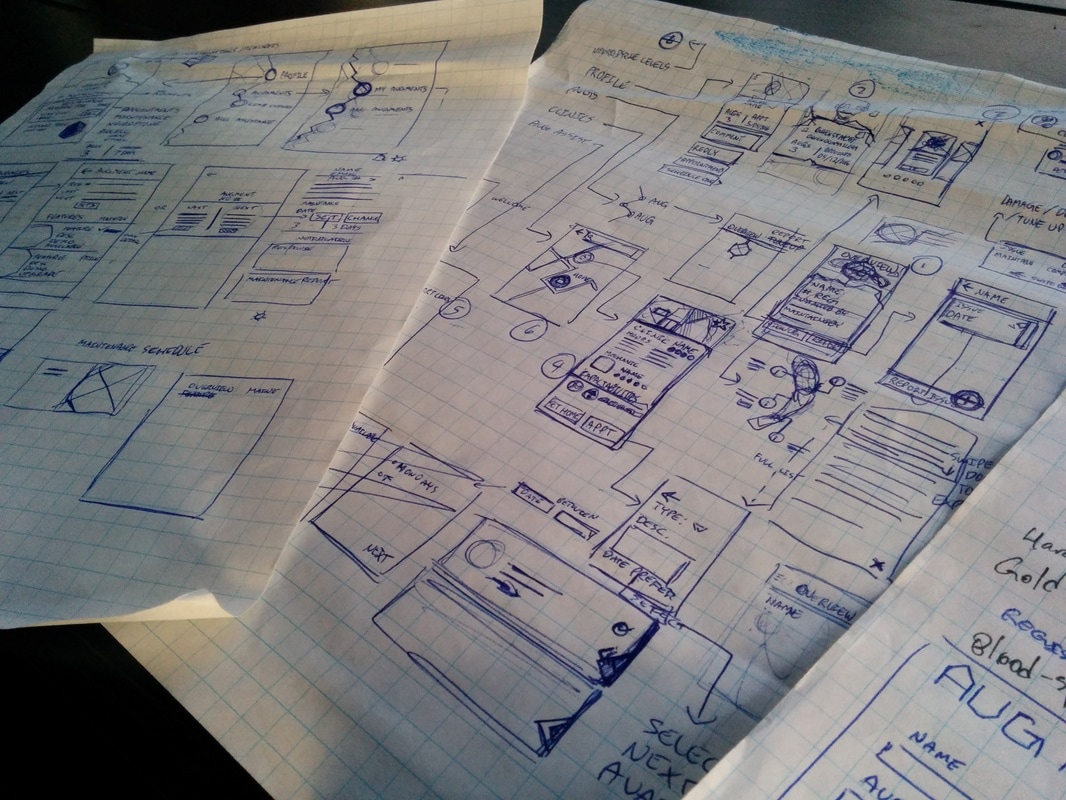
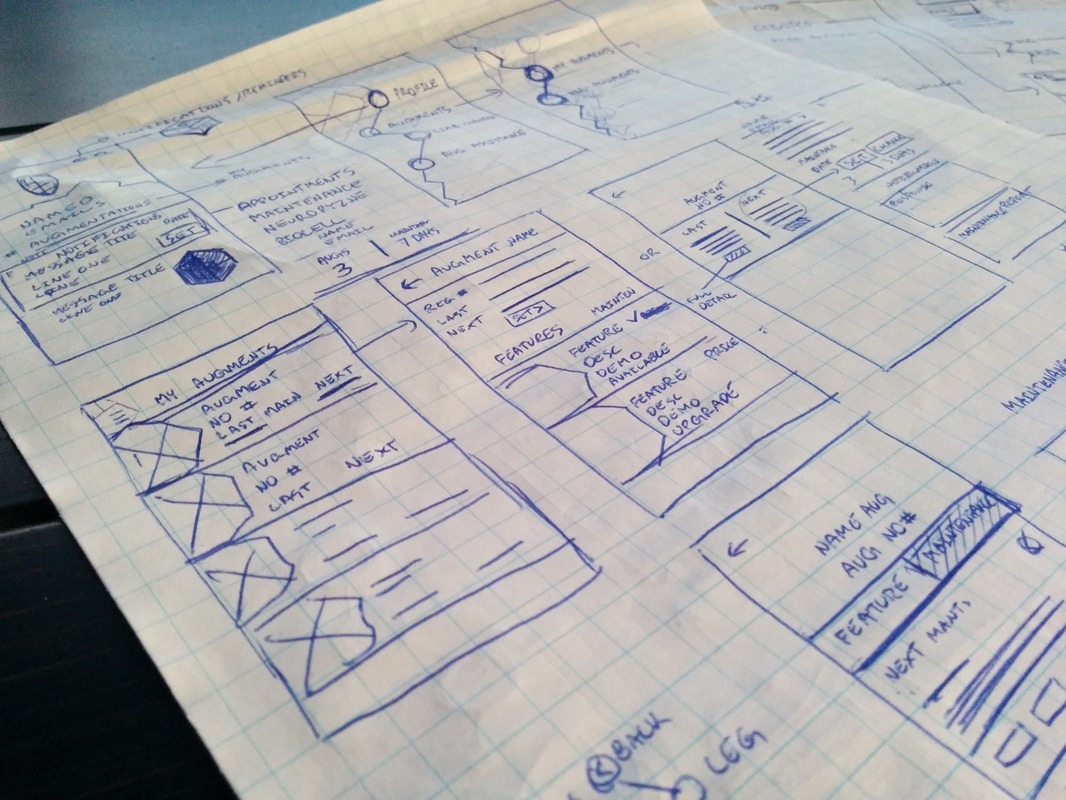
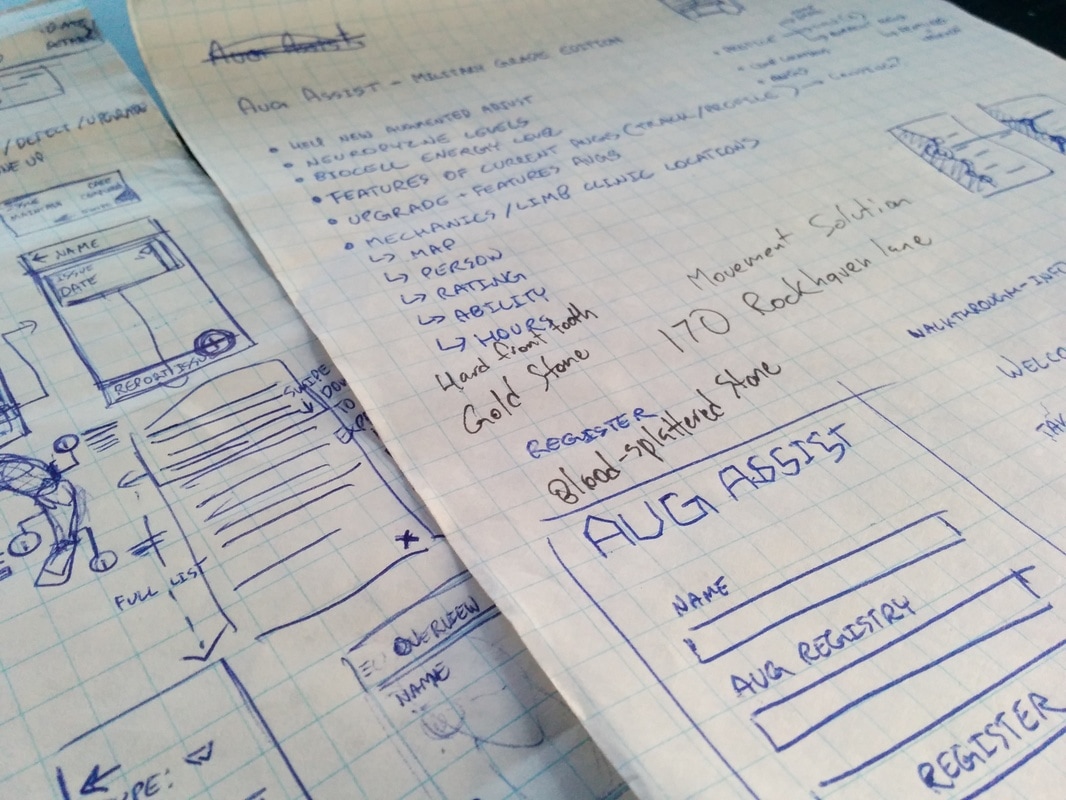
When designing this app (If you want to skip the design philosophy , go to the five paragraph), I mapped out what are the important facets of the game. What are the core features of the game world, what defines the game and its world. After that I went through each point and tried to expand on them. I was trying to see where an app would be necessary. Considering it’s the future, they probably have programs doing a lot of things for them anyway. What I ended up focusing on are the augments themselves. Then the question became, what about them? What do I address? What do augmented people need specifically? In this case, I thought how do people adjust to their augmentations? I assumed, they are walked through the process of getting augmented, but what about after-care? I find after-care a problem in our current health system, where follow-ups are not as prevalent as they should. Anyway, these people have never had augments before. Just like having a prosthetic, people need to adjust accordingly. So, the question I came up with was, how can we help newly augmented people adjust to augmented life? Adjusting to a new way of life is an everyday battle, therefore an app where the user needs constant access would be appropriate.

The next set of questions I had to answer were all focused on what a person would need to help them adjust? The 5 W’s were called into action here! Imagining myself as a person who lives in this world and just got augmented. I listened to the characters in the game to create my profiles. I made a list of possible requirements, however, it was quite cumbersome and bloated. At this point I had to distill the list, what is the bare minimum to make this app viable? What I came up with was users would need a way to track their information. This includes personal data relating to their augmentations such as features, maintenance, and record any issues. They would also need information about the augmentations they have; including but not limited to, definition of features, explanation of personal maintenance, answers to common questions, possible upgrades available for their augmentations. Users would also need to know where to go for maintenance and who they could consult if they have any questions. Sometimes the best help comes from those who are going through the same thing, so a place for users to communicate such as a forum. So to review, augmentation details and information, aug features and upgrades, able to search/find maintenance professionals, track maintenance, provide support lines (both professional and other users).
Picture
​Aesthetics
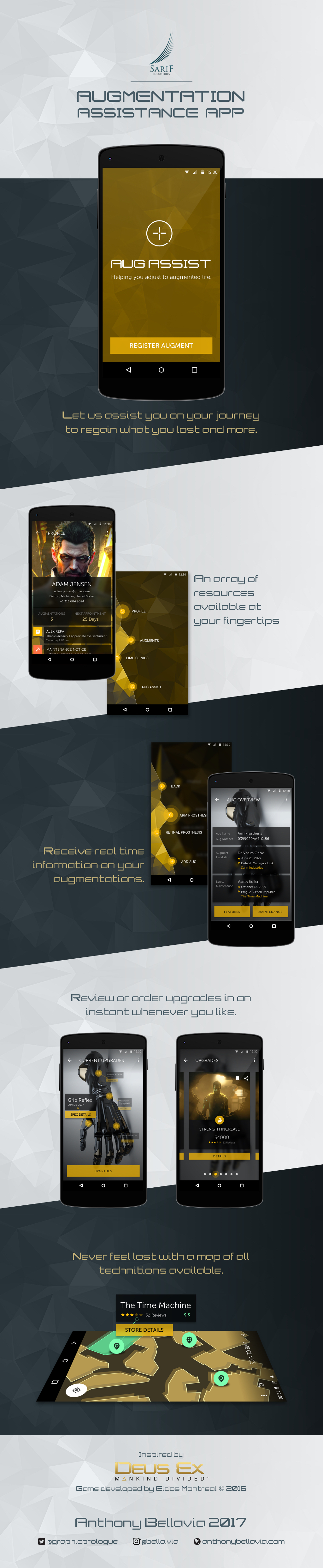
When it came to the aesthetics of the app, I focused on UI and atmosphere of the game. I kept colours, typography, and overall feeling as close as I could to the game to make it seem as if it really could exist there.

How it Works?
The way this app would work is when a patient would get their new augmentation, their doctor/professional would help them register their aug with this app. The doctor/professional would enter details on their augmentation and the procedure. The patient themselves would enter in their details such as name, email, and possibly health card (if country the patient is in has such a system). It here the two can have a dialogue about how to use the app. Now let’s go through the features of the app. 

Once the patient logs in, they will be brought to the app menu as the home screen. There are four major menu options; profile, augments, limb clinics, and aug assist.

Profile
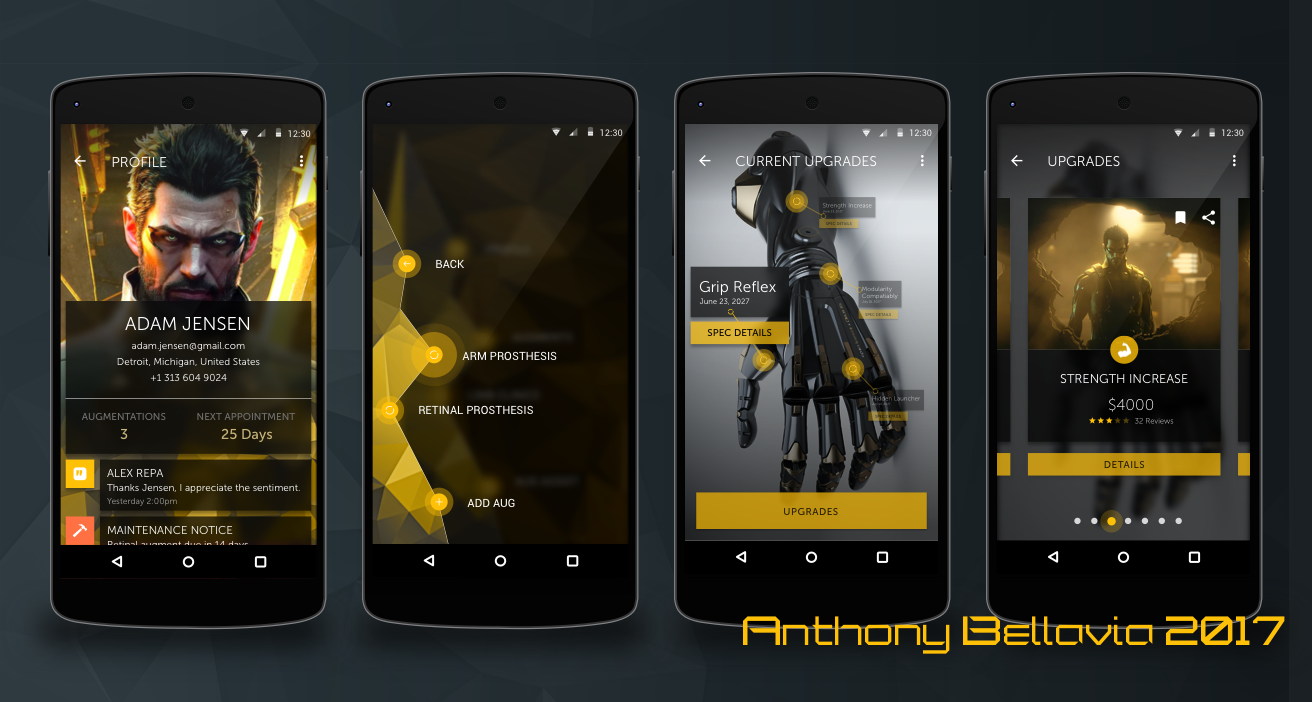
The profile displays the user’s information. It also shows their profile picture, number of augs, and next appointment. Below this information are notifications, whether they be from the aug assist function, maintenance, or any other important information the user needs. The notifications, if tapped, will bring the user to the appropriate page to address it. The user can edit information and settings via the overflow icon in the top-right.

Augments
When a patient taps “AUGMENTS”, the menu will recede as it blurs and darkens. A new submenu be in the foreground listing all the patient’s augmentations as well as the ability to add more if needed (This function will primarily be handed with the doctor/professional). When they select an augmentation, it will open an overview for it. The overview will state the name, registration number, installer, and last maintenance. If someone needs to edit something here, they can go to the overflow menu to do so. At the bottom the patient has 2 options; view features for this augmentation or view maintenance log.

The maintenance log will list all the appointments made with detailed reports available for viewing. It will also show the next upcoming appointment. If there is no next appointment, the area will be filled with the option to set one up and serve as a reminder that they will need one. The user can also setup an appointment by clicking the floating button at the bottom-right. This will open a dialogue screen where the patient will select a location, professional, date & time (the patient can save location and professional for return appointments). The patient will receive notifications as their appointment approaches or when they need to set one up.

The features screen will show a rendering of the augmentation with pinpoints to where current features exist or affect. The latest feature will be in the focus / foreground as the others will recede, becoming translucent and blurred. The patient can select which feature to focus on by tapping them. If they want more details on a feature, they can tap “SPEC DETAILS” to open a new page with the feature details (cost, current maintenance, updates, function, date installed, and by who). The patient can also check for new upgrades by tapping “UPGRADES” at the bottom. This will remove all indicators for current features, then darken and blur the augment rendering. In the foreground will be the upgrades from left to right in a card style. Starting from the top of the card down, patients can bookmark or share upgrades. To access the bookmarks, patients can use the overflow menu at the top-right. Next is a sample rendering example of the upgrade in question. After that, patients will see an icon representing the classification of the upgrade followed by the name of it. To round out the card, the price, rating, and reviews (patients can click on the reviews to view them). Finally, if the patient wants more details on an upgrade they can tap “DETAILS”. Within the detail page is where the patient can purchase and setup the appointment. The purchasing is not on the card to prevent accidental taps and to make sure they themselves are sure they want it.

Limb Clinics
This function works with maps and geo-location. When the patient enters the screen, it will show all clinics closest to their position. For advanced users, they can use the overflow to change the distance, set to show most used/visited (by the patient or others), and much more. The patient can tap a marked location to reveal high level details of the clinic such as; name, rating, reviews, cost, and the ability to check “STORE DETAILS”. Store details will open a modal window with the same information as the high-level details and hours, professionals’ names and ratings/reviews, if the patient has visited them before (clinic or professional marked with a star), and the ability to setup an appointment here by tapping “SET APPOINTMENT” at the bottom.

Aug Assist
When a patient enters aug assist, they will get a brief rundown of what it does and how it functions. Basically, it is a forum for other augmented to communicate and answer each other’s questions or connect on a personal level. Patients can also communicate with professionals via FAQs, assistance forums, and direct chatlines.

The app itself will not be used for extended period of times. It is meant to be digested in small doses. The environment around them may reinforce their use. For example; an ad on a screen appears on a billboard for a new aug or upgrade. A person can check it out on their app right then and there. Another case may be an emergency and they need a clinic, they can check the map function on the app. Push notifications such as appointments will remind users to come back. While retention is important to apps in general, making it so individuals don’t need to rely on the app as much is the measure of success; allowing users to live comfortably with their augmentations.

Reflection
In retrospect, I think a component to directly link the patient to the doctor/professional would have been a good addition. Also a component to track neuropyzne levels for the patient so they know when they need more. Having a toolbar instead of a menu may have been more user friendly. In the discussion of menus, maybe having a settings option available in the main menu might be more efficient.

​I know I wanted to have something different for the upgrades and current features for varieties sake. But, maybe making them similar would have been best for consistency. In terms of upgrades, providing a different method possibly to purchase upgrades would make the experience a little better. While the limb clinic locator is helpful, maybe a button to set a home clinic function would help with repeat visits. As much as I think these changes would be a great improvement, I think a longer time away from the design and some functionality testing with users would either suggest something different or confirm my ideas.

Comments are closed.
Proudly powered by Weebly
  • Projects
  • About
  • Contact
  • Design Process